
BMW SCANNER PASOFT
BMW PASOFT Diagnostic Software v1.4 (Software Only – Interface Required)
BMW PASOFT Diagnostic Software v1.4 (Software Only – Interface Required)
Couldn't load pickup availability
Diagnose and code your classic BMW from your own Windows laptop. Read and clear fault codes, view live data, back up modules and sync EWS–DME on the E46, E39, E38, X5, X3, Z4 and Z8, without a trip to the shop.
Software only – hardware not included. This is the BMW PASOFT v1.4 software. You also need the PASOFT USB interface to use it. Not compatible with K+DCAN cables.
Don't have the interface yet? Get the complete PASOFT Scanner Kit → It includes the interface, cable and this software.
Instant delivery
This is a digital download. Your download link appears on the order confirmation page right after checkout and in your order confirmation email (check your spam folder if you don't see it). The link allows a limited number of downloads, so save the file to your computer.
Compatible vehicles
Full support: E46, E39, E38, E83 (X3), E53 (X5), E52 (Z8), E85 (Z4)
Also works: E36 / Z3 (usually through the 20-pin adapter); E34 (limited functions, through the 20-pin adapter)
Not compatible: newer chassis such as E90, E60, E70 and F-series.
Modules it scans
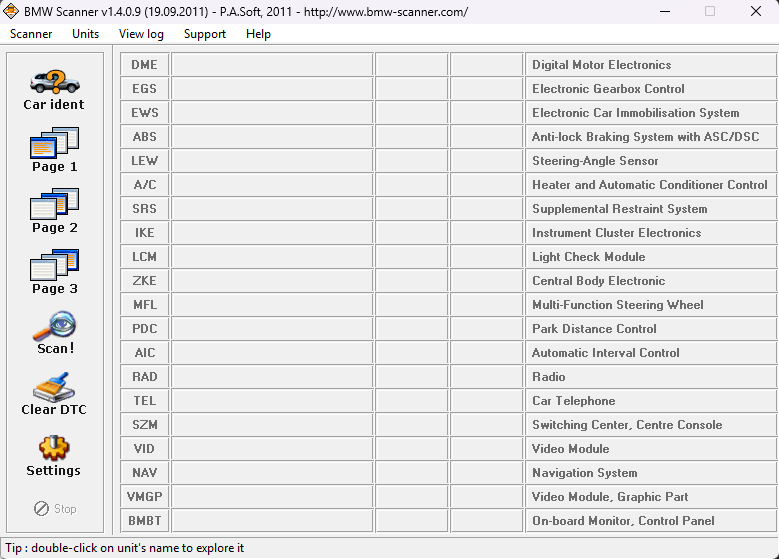
PASOFT scans every control unit it finds and reads its identification data and fault codes. Supported modules include:
- DME – engine (Digital Motor Electronics)
- EGS – automatic transmission
- EWS – immobilizer
- ABS / ASC / DSC – anti-lock brakes and stability control
- LEW – steering-angle sensor
- A/C (IHKA) – heater and automatic climate control
- SRS – airbags
- IKE – instrument cluster
- LCM – light check module
- ZKE – central body electronics (locks, windows)
- MFL – multi-function steering wheel
- PDC – park distance control
- AIC – rain sensor (automatic interval control)
- SZM – centre console switches
- RAD, TEL, NAV, VID, VMGP, BMBT – radio, phone, navigation, video and on-board monitor
Fault codes can be cleared in DME MS43.0, EWS3 and SRS MRS4. Other modules can be scanned and identified. Available functions depend on the modules fitted to your car.
Requirements
- PASOFT USB interface (not K+DCAN)
- Windows 7, 8, Vista, 10 or 11
- 20-pin adapter for cars with the round underhood port
- Remote setup support included
Key functions
- Identifies chassis, model, engine, gearbox and equipment
- Scans all modules and reads identification data, odometer value, VIN and ADFG, programming info (UIF) and fault codes (DTCs)
- Reads and saves program memory, EEPROM, coding data, DTC shadow memory and live data
- Copies ZCS (IKE–EWS) and FA (IKE–LCM) coding
- DTC descriptions and clearing in DME MS43.0, EWS3 and SRS MRS4
- EWS–DME sync code in DME MS43.0
- Live data in DME MS43.0, EWS3, SRS MRS2 and MRS4
- Key status in EWS3, EWS3 coding interpretation, equipment correction in SRS MRS4
FAQ
Will this work with my K+DCAN cable? No. It requires the PASOFT interface.
Will it work on my E36 or E34? E36 yes, usually with the 20-pin adapter. E34 with limited functions.
Can it turn off my airbag (SRS) light? It can read and clear SRS fault codes in MRS4 modules. If the fault is still there, such as a bad seat sensor or clockspring, the light will come back until the part is fixed.
Which should I buy? Already have the PASOFT interface: this software. Starting from scratch: the Scanner Kit.
Will it fit my BMW?
Will it fit my BMW?
Full support:
- 3 Series E46 (1999–2006)
- 5 Series E39 (1997–2003)*
- 7 Series E38 (1995–2001)*
- X5 E53 (2000–2006)
- X3 E83 (2004–2010)
- Z4 E85 (2003–2008)
- Z8 E52
With the 20-pin adapter:
- 3 Series / Z3 E36 (usually works)
- 5 Series E34 (limited functions)
*Earlier E38 and E39 cars with the round 20-pin port under the hood need the 20-pin adapter.
Not compatible: E90, E60, E70, F-series and newer. Not sure which chassis you have? Email info@bmwpasoft.com with your model and year before ordering.
How do I get the software?
How do I get the software?
The software is an instant digital download. Your link appears on the order confirmation page right after checkout and in your order confirmation email (check spam if you don't see it). The link allows a limited number of downloads, so save the file to your computer.
Setup and support
Setup and support
Requires a Windows 7–11 laptop (Mac not supported). On Windows 10/11, driver signature enforcement must be turned off to install the driver. Follow our setup guide, and remote setup support is included if you get stuck.
Returns
Returns
All sales are final, so please check compatibility before ordering. Defective hardware is replaced. See our refund policy.
Share
It works ok on my bmw318i e46
I’ve used this now on my E53, E38 and E24